AWS Powershell Tools: Where’s the rest of the information?

If you haven’t noticed, I’m a proponent of using AWS Powershell tools for managing your AWS resources. There’s a bit of a learning curve if you’re not already familiar with Powershell or .NET, but Amazon has put a significant amount of time into developing the .NET class structure behind the Tools, which creates a pretty rich tool set.

However, for the novice user this can be a bit confusing. I recently did a post on finding where your AWS Codepipeline artifacts get stored, and demonstrated both a CLI method for using it, and a Powershell method.

The CLI method is pretty straightforward the command here:

dumps out a HUGE json blob with all of the information you could ever want about your Pipeline. Stages, name, pipeline ID, and artifactore are all right there.

And you might expect the Powershell tools to be just as informative right away, but you’d be wrong. The equivalent command in powershell returns much less:
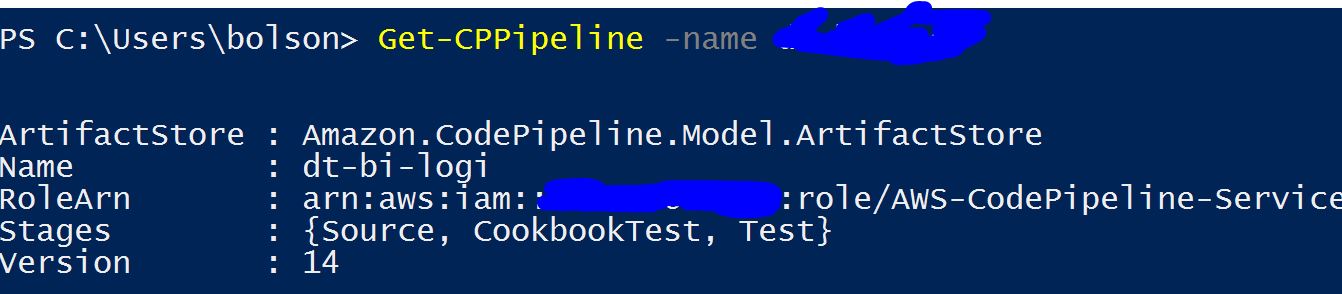
At first, I reacted the way you probably would: with frustration. Quite a bit of it! Where’s all the information I got out of the CLI?

A handy dandy powershell command to know is “Get-Member” which returns the functions and properties of an object. Let’s give it a try on what’s returned from Codepipeline:
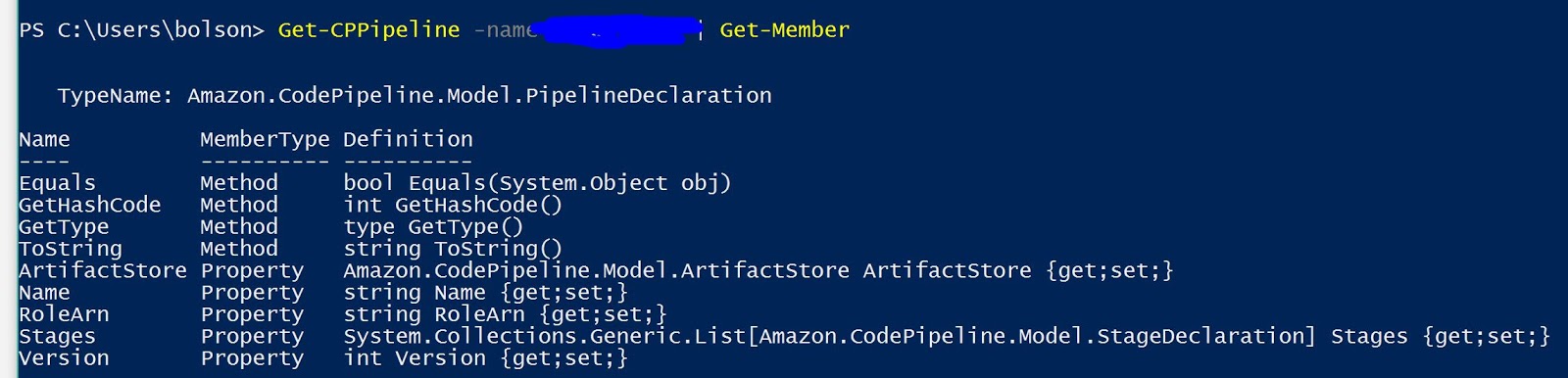
And there it is! There’s an “artifactstore” property, so with the simple:

(Get-CPPipeline -name ).artifactstore

I have the artifact store. But let’s zoom in a little on what “Get-Member” returned for me:

And now I can see that there is also a set method for this object! If I have the proper permissions I can set the artifact store as well as view it. Continued examination shows me other properties, including the name, have get and set attributes as well. Pretty handy!

Where are my Codepipeline artifacts?

AWS Codepipeline is a CICD service that lets automate running changes through a “pipeline” and performing different actions at different stages. Getting started with it through the GUI was relatively simple, but after a few months of using it I wondered what it was doing behind the scenes.

One question that kept bothering me was, “Where is it storing my artifacts?” Codepipeline can monitor a number of different sources for changes that need to be run through the pipeline such as CodeCommit, Github, and S3, but it isn’t obvious how it gets these changes somewhere it can start operating on.
As is often the case with AWS the CLI (or Powershell tools) are the easiest way to dig a little deeper. First, use the command
aws codepipeline list-pipelines
on the CLI to list pipelines or

Get-CPPipelineList

in powershell to list the Pipelines you have in that region. After that you can get more information about the Pipeline with

aws codepipeline get-pipeline --name 

or in Powershell

(Get-CPPipeline -name ).artifactstore

For the CLI you can find the JSON object “ArtifactStore”, or in powershell you can access the attribute directly. It turns out that Codepipeline creates an S3 bucket for you behind the scenes, and gives it a unique name. Your artifacts get stored here under a key that’s a truncated version of the Output artifact name, and a version guid.