When I was a senior in college (longer ago than I should admit to) I did a demonstration about sniffing user’s facebook traffic when they were using wifi at my college. At the time Facebook didn’t redirect HTTP -> HTTPS by default and most users were connecting over plaintext.
Since then Facebook has switched to secure browsing by default, and most companies are encrypting traffic in transit whether it’s internal or external. With that sprawl of encryption it’s can be important to have some understanding of how root signing certificates work, and understand what root certificates your system is trusting. For this post we’ll work with HTTPS clients in Ruby (specifically HTTParty).
When should you care about what your library trusts?
Most of the time you don’t need to worry about it. HTTP libraries and most OS’s come with a default set of public certs they trust. If you’re curious (and on windows) you can check your machine’s listing by running Start -> MMC and adding the certificates snap in for your computer account
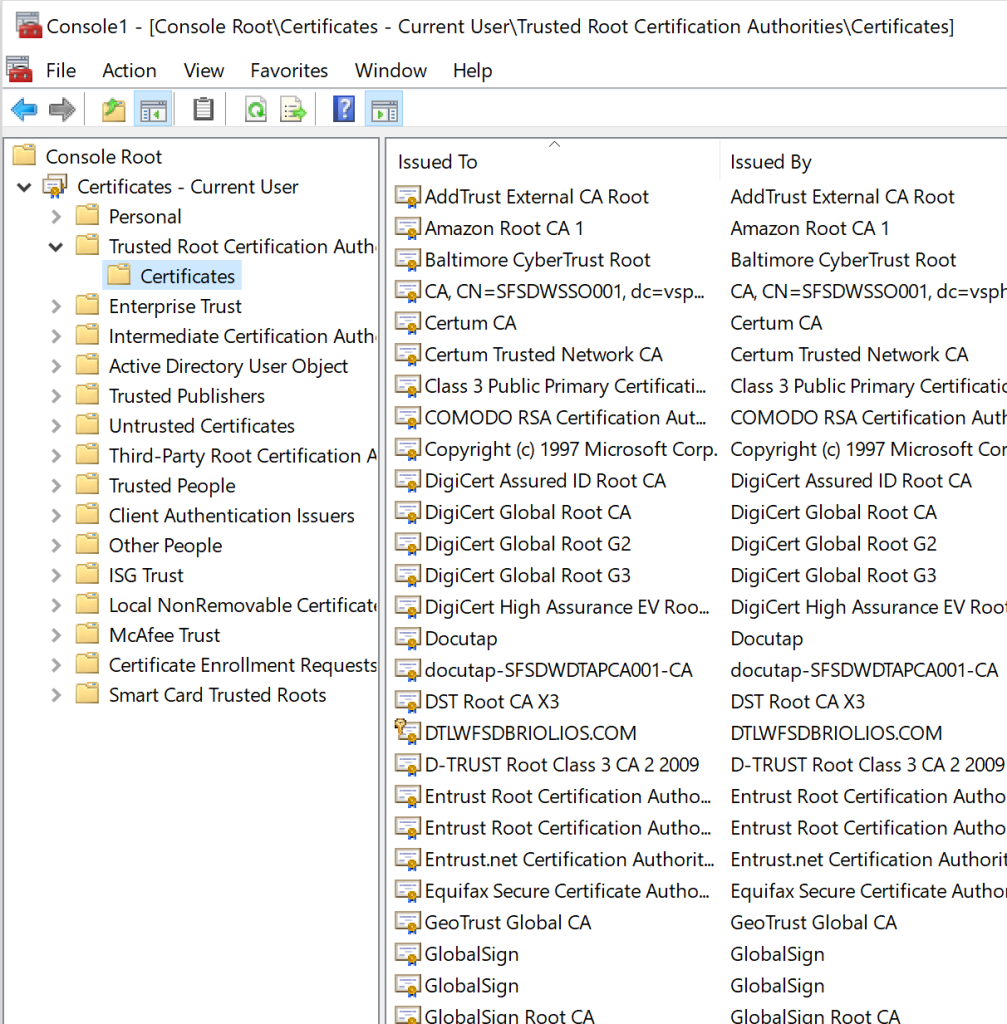
It’s a pretty standard list of names you might recognize like DigiCert, GlobalSign, etc. These let your computer trust a normal list of services, and as long as a service takes the time to get a certificate from one of these CA’s you’ll be able to connect to it.
So when should you be worried about what certs your library trusts?
- When you might be working with Self Signed certs (like on an internal network)
- When you have a very old client that may not have an up to date list
- If you’re service is using a newer trust authority like LetsEncrypt
Starting at the top
HTTPary has an initialize method that let’s you set the HTTP scheme (HTTPS/HTTP)
https://www.rubydoc.info/github/jnunemaker/httparty/HTTParty/Request#initialize-instance_method
Which lets you decide if you’re going to make a secure or a plaintext request
Finding our defaults
Now that we know we’re going to make a secure request, we need to understand what our library will do by default. There are two methods for setting a CA file, or a CA path
Unfortunately there is no description in the doc of what the library will use by default. That’s not really a knock on the developer, most of the time you don’t have to worry about it.
For let’s dive into the source code: https://github.com/jnunemaker/httparty/blob/master/lib/httparty.rb#L427
And there we see a method that will set the default options.
To be frank, this is where my Ruby knowledge breaks down. The next reference I can find to the default cert store is here
https://github.com/jnunemaker/httparty/blob/master/lib/httparty/connection_adapter.rb#L81
@default_cert_store ||= OpenSSL::X509::Store.new.tap do |cert_store|
Searching that ruby class brings me to this page: https://ruby-doc.org/stdlib-2.4.0/libdoc/openssl/rdoc/OpenSSL/X509/Store.html, which says you can normally find the defaults by looking at OpenSSL::X509::DEFAULT_CERT_DIR
Plenty of searching in Ruby-doc.org hasn’t shown me what that value is – so when all else fails we can just go take a look. Let’s power up a ruby docker container with
docker run -it ruby /bin/bash
Then we jump into the interactive ruby console by typing irb and importing OpenSSL package by typing require 'openssl'. Lastly we can print what the default cert directory with print(OpenSSL::X509::DEFAULT_CERT_DIR)
irb(main):002:0> print(OpenSSL::X509::DEFAULT_CERT_DIR)
/usr/lib/ssl/certs=> nil
And it turns out /us/lib/ssl/certs is a link to /etc/ssl/certs
root@caf6415446ff:/# ls -l /usr/lib/ssl/certs
lrwxrwxrwx 1 root root 14 Oct 12 19:56 /usr/lib/ssl/certs -> /etc/ssl/certs
Which has a ton of certs in it
root@caf6415446ff:/# ls -l /etc/ssl/certs/ | wc -l
258
And there you have it! Now you can comb through the certs in this directory.
Final thoughts
Certs are intimidating when you get started because they seem like magic, and they’re plenty complicated. But at the same time you can abstract some of that complexity away by understanding some basics like when your cert trust store matters.
I went into some detail on finding the default trust store because I think it’s helpful to see that you can make a lot of progress understanding certs just by digging through a repo and looking at source code.
 Rolling Websphere