Overflowing

Do you ever have trouble learning outside of work? I certainly do. In college, during the summers, I felt like I had tons of time and concentration to dedicate to personal projects and ideas. Now, when I try to pick up a technical book outside of work, my brain stalls. Have the time, when I try to pick up a technical book at work my brain stalls. Here’s my theory. Your brain is like this:

And the water is all of the topics you’re expected to keep
track of and have ready on a moments notice when your boss or coworker asks you about them. There is no way you can actually keep track of all of these topics, some of them spill off and you need a refresher before you can talk about the intelligently.

Then, if you’re trying to learn, you’re brain does this.

Platonic Computer Science

Recently I encountered a file permissions issue. Long story short, I had a service that needed to run a .bat file, but because of a Windows quirk, it needed list access to the root of the drive the file was on. I called up my friends at our Information Security department and after getting transferred around a bit, I was informed that their policy was to not grant special access to the root of any
drive.

Rather, their preferred solution was to create a file share and grant the ID access to that, and then require the ID to reference the share through it’s UNC path name.

The computer scientist in me balked at the idea (thankfully I kept it all internal). “Are you kidding me? I’m not sure windows is smart enough to figure out the share is local, the service might wind up bouncing off of a switch or router somewhere to get to a drive on a machine it’s already on! Clearly this is not a good solution.” (It’s like typing “google” into Chrome’s awesome bar to pull up google.com and search for something).

I took some time to think about it and try to come up with a better solution (because there are better solutions out there) but then I stopped to think about it. This is a business, and the goal of every business is to make as much money as possible and spend as little as possible making it. Our information security department has a system they understand and are comfortable with and are providing a workable solution to allow my project to continue (round-a-bout as it may be). The argument, “We can’t do that! It’s….it’s…..bad!” Isn’t going to hold much water.

From a business perspective, there’s no noticable performance drain, no monetary reason not to use the solution that’s in place. It would also cost a significant number of hours to research a “better” solution and train the employees on how to implement and use it.

We computer scientists often think we are working on Platonic computer science. Computer science for computer science’s sake, make it as correct as possible just because it’s more correct. For better or worse, we don’t. We all want to get paid for what we do, and for that to happen, we need to be making the company money and not wasting more than we need to.

I’m not saying we’re going to stick with this solution, I discussed with my manager long enough to get some time to look into a more correct solution. But before you go after your business area for implementing a less correct or less technical solution, do some quick mental cost/benefit analysis of what you want to suggest and make sure it’s as good for the wallet as it is for correctness.


Knee-jerk Scripting

Some people become programmers because they like math, some because they like video games, but most because they are lazy. That’s right, lazy. Picture this scenario (the names have been changed to protect the guilty).

Lizzie comes by my desk to discuss a project. They’re trying to migrate off one cms to another and want me to nam manage the worth for my team (hundreds, perhaps thousands of pages). My first question: “Have you guys scripted this already?”
Her response, “No. It would take to much time to figure out how to script this. We don’t have time.”
In my head, But you have the time to copy then all one at a time?
I asked around a little among some of the engineers and found out that Lizzie hadn’t researched the scripting option at all. The ability to automatically copy pages was built into the api of both systems.
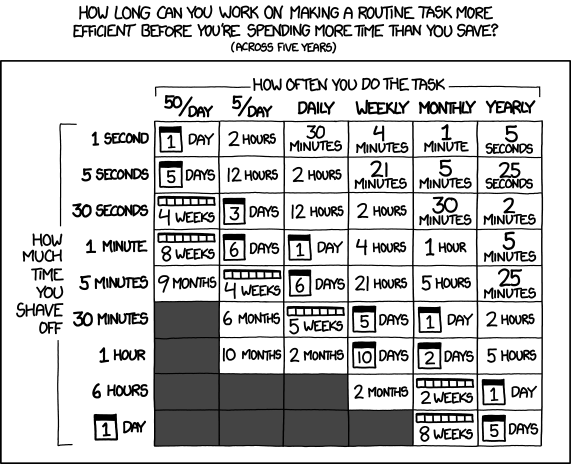
Scripting isn’t always the answer to repeat tasks, but it usually is. To end this post, I’ll reference xkcd.
Xkcd.com/1205

Hold on….why did they let it do that?

When we work with computer systems, we rarely imagine the people who designed them. If we do, we only think of them in their work context, abstract entities that give us their product and answer our questions about it. We don’t like to think about them being dumb, or having a sense of humor. I’m not sure which of those two to chalk this
little “feature” up to.

I was working with a wiki product recently, made a few changes, and saved the document. A nice little save window popped up like you’d expect.

I moved my mouse back to the task bar when I noticed that my mouse changed when I moved it over the blue bar at the top of the window. A split second later, the page finished saving and the save box was gone. I opened the doc back up, made another change and saved it just to take a look. Sure enough, when I moved my mouse of the blue bar, I got a movement option.

Here it is delightfully displayed over the other toolbars. Why on earth does it do that? There is nothing else on that page to work with during the save. Nothing at all. There is nothing I’d be interested in looking at, nothing useful to me. There are only two possible answers to why I can move the save box:
The developers got it for free with some framework for creating pop up boxes on web pages, didn’t think about the feature set available and what should be turned off. If this is the case, picture your vendor’s developers like this:

Or, the developers were playing around, figured out how to do something cool and left it in there as an easter egg, in which case, your vendor’s developers are more like this.

It’s a subtle, but significant difference.

I was told there would be support?

If you work in a technical position and use any sort of vendor product you have likely had to call them for help with their technology.
Here we run into a question: do you have engineers answer the questions more slowly or hire non technical people to answer more quickly.
It’s can’t decide which I prefer. Each option has it’s pros and con’s. Right now, in more bitter about having non technical people answer more quickly.
I called IBM recently to get help with one of their version control tools. I was deep, deep inside the configuration (so deep I could barely feel the keyboard) but I ran into a problem. My password to the licensing center wasn’t working.
My phone was handy, so I called support and explained the situation  and that I needed my password reset. Their first question: what browser version are you running?
It may not sound that bad, but it jerked me out of my zone pretty good. Every sharepoint engineer has experienced the same thing. You call Microsoft and ask a question, but instead of help they respond: Why aren’t you using IE?
These situations make all of us feel like this poor guy:

No Progress Bars in Hacking

I have played through the following scenario at least three times now.

Me: Hello Information Security, I need admin access to for to complete . Would you be able to give it to me?

Info Sec: Thanks for the request. We’ll get back to you.

Info Sec: We don’t feel you need access for . In our experience should only take a tenth of . How about we give you admin access for half of ?

Me: *Grumble grumble* That’s really not what I need. I won’t be able to do my job if I don’t have admin access for for trouble shooting.

Info Sec: Fine, you can have admin access for half of plus one day. Thanks!

I think info sec gets the idea from watching movies like Skyfall where the computer guys watches a colorful map that shows what’s been “hacked” with a count down for how long the hacking will take.

They assume if I have a dastardly plan, and I requested two months of access, giving me access for five days less than that means my evil plot will get cut off just in the nick of time and everyone will be saved. Yay!

Any real computer person knows that if you wanted to damage a server or steal data any amount of time over 15 seconds is probably plenty.

I know we all have to deal with security theatre, but it doesn’t make it any less frustrating.

Perspectives: Purchasing Technology

As someone who works in enterprise IT, I can understand developers’ frustration with purchased technology.  As developers, however, we must learn (for the sake of our own jobs, if for no other reason) to understand the perspectives of those around us.  Doing so will allow us to fully understand the roadmap behind business decisions, and provide the organization with synergy.  Take an enterprise class web server, for example.  This tool could potentially be perceived in any of the following ways . . .

Purchasing

Upper Management

Corporate Communications

The Developer (those guys with the “typey things”)